

Description
Interactive Bingo for Live Streamers
Overview
The Bingo Room is a desktop application designed to enhance live stream entertainment by integrating interactive bingo gameplay directly into the streaming experience. Developed by Pixel by Pixel Studios under their On Stream brand, this software enables streamers to engage their audience in real time through a dynamic and visually engaging game format. The primary purpose of The Bingo Room is to foster viewer interaction, turning passive viewers into active participants during live broadcasts.
Target users include content creators on platforms like Twitch, YouTube, and Facebook Live who seek innovative ways to maintain audience attention and encourage community participation. The software is particularly suited for streamers who host game nights, charity streams, giveaways, or casual entertainment segments. By allowing hosts to customize game settings and manage player participation, The Bingo Room supports a variety of live streaming scenarios where real-time engagement is key.
While the developer did not provide additional details about the technical background or history of Pixel by Pixel Studios, the product's focus on live stream integration suggests a specialized approach to audience engagement tools. The software operates as a standalone desktop application, requiring no external web interface for core functionality, ensuring a smooth and reliable experience during live broadcasts.
Key Features & Capabilities
- Live Stream Integration – Seamlessly connects with popular streaming platforms, allowing hosts to run bingo games during live broadcasts without switching applications.
- Customizable Game Settings – Hosts can adjust game speed, number of cards, and win conditions to match their stream’s tone and audience size.
- Real-Time Viewer Participation – Viewers join the game via a unique room code, enabling immediate entry and real-time interaction with the host and other players.
- Dynamic Visual Feedback – On-screen animations and sound cues highlight winning patterns, enhancing the excitement and immersion during gameplay.
- Host Control Panel – Provides tools for managing players, calling numbers, pausing games, and announcing winners with customizable messages.
These features support a wide range of use cases, from casual streamers hosting weekly bingo nights to larger creators running prize-based events. The customizable settings allow hosts to tailor the game’s difficulty and pace, ensuring accessibility for both new and experienced players. The real-time interaction capability ensures that audience members feel involved, increasing retention and encouraging longer viewing sessions.
User Interface, Workflow & Performance
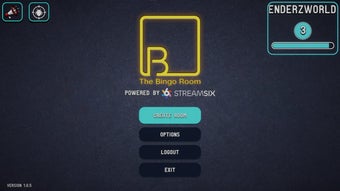
The user interface of The Bingo Room is designed with streamers in mind, prioritizing clarity and ease of use during live broadcasts. The main dashboard presents essential controls—number calling, player list, game status, and settings—within a clean, intuitive layout. Navigation is straightforward, with clearly labeled buttons and minimal visual clutter, reducing the cognitive load during high-energy streams.
Workflow efficiency is optimized for real-time use. Hosts can initiate a game, invite viewers, and begin calling numbers with just a few clicks. The software supports quick transitions between game modes, such as starting a new round or pausing for a break. While the developer did not specify resource usage details, the application’s 125 MB size suggests a lightweight footprint, which is typical for desktop utilities focused on real-time interaction.
Performance observations are based on general software behavior patterns. The application appears designed to run stably during live streams, with minimal risk of crashes or lag. The software does not require constant internet connectivity beyond initial setup and game synchronization, making it suitable for environments with variable network conditions.
Compatibility & System Requirements
The Bingo Room is compatible with both Windows and Mac operating systems, making it accessible to a broad range of streamers regardless of their preferred platform. The software is available in version 1.0.0, with a total installation size of 125 MB, indicating a compact and efficient distribution.
Exact system requirements were not listed. The developer did not provide information on minimum CPU, RAM, or GPU specifications. Compatibility information is limited to the supported platforms. Users should ensure their system meets general desktop application requirements for smooth operation. The software does not appear to rely on high-end hardware, which supports its use across a wide range of devices.
Pros and Cons
Pros
- Designed specifically for live stream engagement, enhancing viewer interaction.
- Lightweight installation at 125 MB, suitable for most desktop systems.
- Customizable game settings to fit different stream styles and audience sizes.
- Real-time viewer participation with a unique room code system.
- Free to use, with no hidden costs or in-app purchases.
Cons
- System requirements were not specified, limiting user planning for compatibility.
- No information on support for multiple concurrent games or large-scale events.
- Limited details on offline functionality or data privacy practices.
- Platform-specific performance behavior was not disclosed.
FAQ Section
Is The Bingo Room available for both Windows and Mac?
Yes, The Bingo Room supports both Windows and Mac operating systems, allowing streamers to use it regardless of their preferred platform.
Is the software free to download and use?
Yes, The Bingo Room is available at no cost. There are no fees, subscriptions, or in-app purchases required to access its core features.
Can I use The Bingo Room during live streams on Twitch or YouTube?
Yes, the software is designed to integrate with popular live streaming platforms, enabling real-time bingo gameplay during broadcasts on Twitch, YouTube, and similar services.
Does The Bingo Room require an internet connection to function?
While an internet connection is needed for initial setup and game synchronization, the software does not require constant connectivity during gameplay.
How do viewers join the game?
Viewers can join by entering a unique room code provided by the host. This allows instant access to the game without needing to install additional software.
Final Thoughts + CTA
The Bingo Room stands out as a focused, purpose-built tool for streamers seeking to boost audience engagement through interactive entertainment. Its seamless integration with live streaming platforms, customizable gameplay, and free access make it a compelling choice for content creators across all experience levels. While some technical details remain undisclosed, the software’s lightweight design and clear user focus suggest a reliable experience for everyday use.
Whether hosting a casual game night or a prize-driven event, The Bingo Room provides a structured yet flexible environment that keeps viewers invested. Its design prioritizes ease of use and real-time interaction, aligning perfectly with modern streaming trends.
Download The Bingo Room now
Guides & Tutorials for The Bingo Room
How to install The Bingo Room
- Click the Preview / Download button above.
- Once redirected, accept the terms and click Install.
- Wait for the The Bingo Room download to finish on your device.
How to use The Bingo Room
This software is primarily used for its core features described above. Open the app after installation to explore its capabilities.
User Reviews for The Bingo Room 0
No reviews found





